Cloud Computing
Cloud computing is a model for enabling ubiquitous, convenient, on-demand network access to a shared pool of configurable computing resources (networks, virtual machines, storage, applications, and services) that can be rapidly provisioned and released with minimal management effort or service provider interaction.
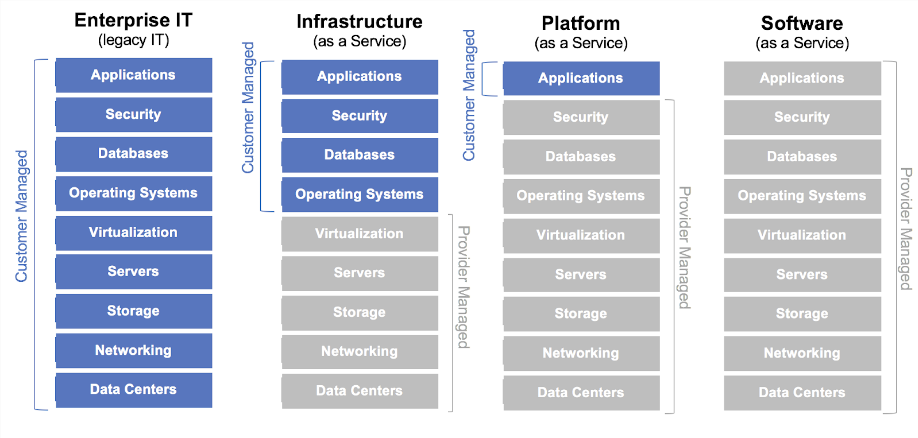
IaaS
Infrastructure as a service (IaaS) refers to online services that abstract the user from the details of infrastructure like physical computing resources, location, data partitioning, scaling, security, backup etc.
- Example providers:
- AWS, Google Cloud, Azure
- Arvan Cloud, Abr Aras (closer to home)
- Not IaaS: VirtualBox and VMware Workstation are hypervisors you run yourself — the technology underneath, not the service
PaaS
Platform as a service (PaaS) or application platform as a service (aPaaS) is a category of cloud computing services that provides a platform allowing customers to develop, run, and manage applications without the complexity of building and maintaining the infrastructure typically associated with developing and launching an app.
SaaS
SaaS applications are sometimes called Web-based software, on-demand software, or hosted software. Whatever the name, SaaS applications run on a SaaS provider’s servers. The provider manages access to the application, including security, availability, and performance.
In computing, a virtual machine (VM) is an emulation of a computer system.
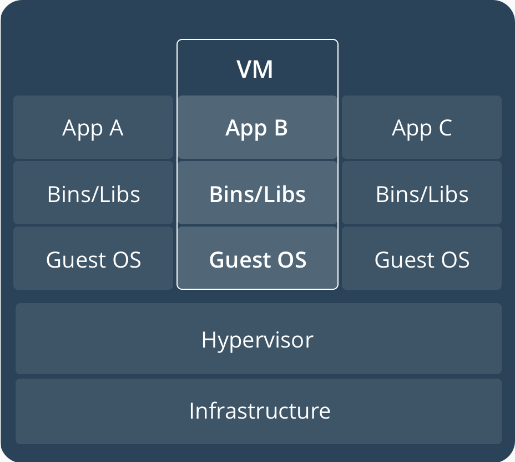
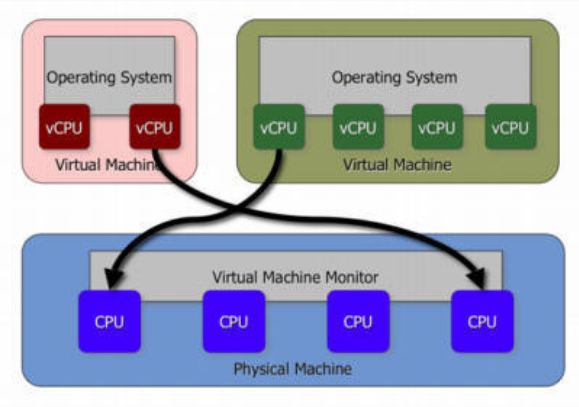
Virtualization Techniques
- The VM-based approach virtualizes the complete OS. The abstraction it presents to the VM are virtual devices like virtual disk, virtual CPUs, and virtual NICs. With virtual machines, multiple OSes can share the same hardware resources, with virtualized representations of each of the resources available to the VM.
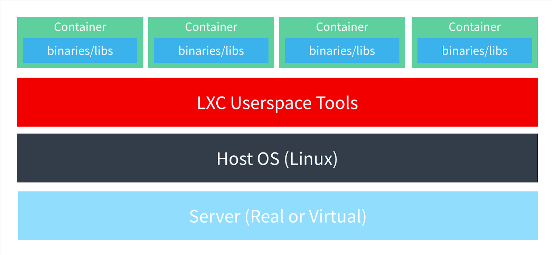
- Container-based form of virtualization doesn't abstract the hardware but uses techniques within the Linux kernel to isolate access paths for different resources. It carves out a logical boundary within the same operating system.
Hypervisors
A special piece of software is used to virtualize the OS.
CPU Virtualization
- Binary Translation in the Case of Full Virtualization: In this case, the guest OS is used without any changes. The instructions are trapped and emulated for the target environment. This cause a lot of performance overhead, as lots of instructions have to be trapped into the host/hypervisor and emulated.
- To avoid the performance problems related to binary translation when using full virtualization, we use paravirtualization wherein the guest knows that it is running in a virtualized environment and its interaction with the host is optimized to avoid excessive trapping.
CPU Virtualization (Contd)
- In 2005, x86 finally became virtualizable. Advantages of
hardware-assisted virtulization
are two fold:
- No binary translation
- No OS modification
IO Virtualization
- With full virtualization, the guest does not know it's running on a hypervisor and the guest OS doesn't need any changes to run on a hypervisor.
- In paravirtualization case, the guest OS is made aware that it's running in a virtualized environment and special drivers are loaded into the guest to take care of the I/O.
The Quick Emulator (QEMU)
- The QEMU runs as a user process and handles the KVM kernel module.
- It uses the
vt-xextensions to provide the guest with an isolated environment from a memory and cpu perspective. - The QEMU also dedicates a separate thread for I/O. This thread runs an event loop and is based on the non-blocking mechanism.
- The QEMU can use paravirtualized drivers.
Containers
Containers are an abstraction at the app layer that packages code and dependencies together. Multiple containers can run on the same machine and share the OS kernel with other containers, each running as isolated processes in user space.
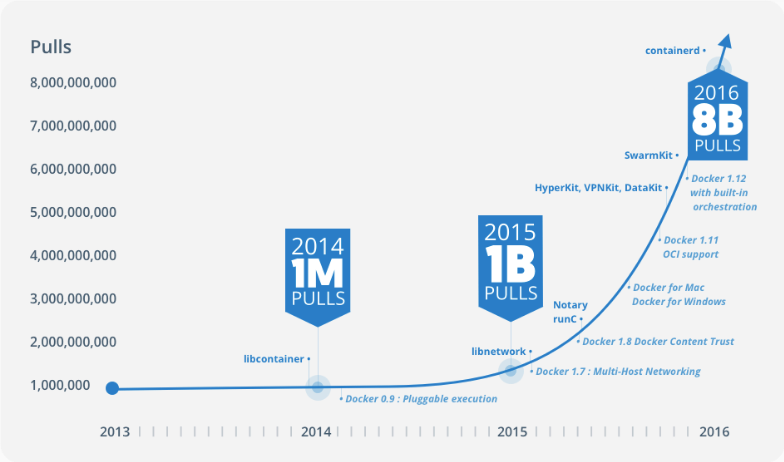
Containers vs VMs (Pros)
- Lightweight (MBs vs GBs)
- Easier Deployment
- Easier Portability
Containers vs VMs (Cons)
- Better control in virtual machines
- Have been tested over the years
- Linux namespaces
- cgroups
- Layered file systems
Namespace
- A namespace is a logical isolation within the Linux kernel.
- A namespace controls visibility within the kernel.
- All controls are defined at the process level.
Container Engines
- docker (moby)
- podman — daemonless, rootless
- containerd and CRI-O — what actually runs containers under Kubernetes
- rkt ⚰️ — archived by the CNCF in 2020
403 Forbidden
You cannot access docker from Iran
So What?!
- HTTP Proxy
- Shecan
- etc.
Hello World :)
docker run hello-world
Days before Docker
- Installing dependencies of your app on host machine
- Creates conflict with previous installation
- Separate Environment - Separate Runtime
- Code that runs on one system and doesn’t on the other
Days after Docker
- Dependencies and runtime environment are all in the same place
- No need to install any dependency 💃
- Ensuring your app and your dependencies travel together
Docker Image
An image is a lightweight, stand-alone, executable package that includes everything needed to run a piece of software, including the code, a runtime, libraries, environment variables, and config files.
Docker Container
A container is a runtime instance of an image – what the image becomes in memory when actually executed. It runs completely isolated from the host environment by default, only accessing host files and ports if configured to do so.
Dockerfile
A Dockerfile is a text document that contains all the commands a user could call on the command line to assemble an image.
# Format: FROM repository[:version] — pin it, "latest" moves under you
FROM ubuntu:24.04

# One RUN, so the update and the install land in the same layer. Split
# across two layers, a cached update can feed a stale package index.
RUN apt-get update && apt-get install -y --no-install-recommends \
      ca-certificates curl gnupg \
    && rm -rf /var/lib/apt/lists/*

# apt-key was removed in Ubuntu 22.04. Keys now live in /etc/apt/keyrings
# and are named by the source that uses them.
RUN curl -fsSL https://pgp.mongodb.com/server-8.0.asc \
      | gpg --dearmor -o /etc/apt/keyrings/mongodb.gpg \
    && echo "deb [signed-by=/etc/apt/keyrings/mongodb.gpg] \
https://repo.mongodb.org/apt/ubuntu noble/mongodb-org/8.0 multiverse" \
      > /etc/apt/sources.list.d/mongodb-org.list

RUN apt-get update && apt-get install -y --no-install-recommends mongodb-org \
    && rm -rf /var/lib/apt/lists/*

RUN mkdir -p /data/db

# Documents the port; it does not publish it. That is -p at run time.
EXPOSE 27017

ENTRYPOINT ["/usr/bin/mongod"]
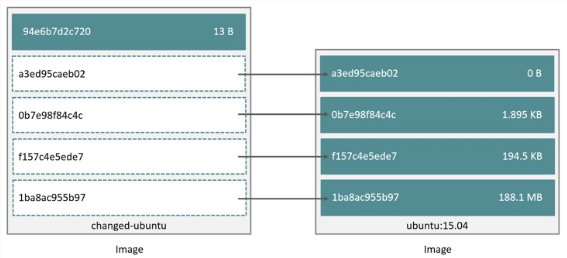
Image Layers
Docker CLI (Cheatsheet)
docker build -t friendlyname .        # Create image using this directory's Dockerfile
docker run -p 4000:80 friendlyname    # Run "friendlyname" mapping port 4000 to 80
docker run -d -p 4000:80 friendlyname # Same thing, but in detached mode
docker ps                             # See a list of all running containers
docker stop hash                      # Gracefully stop the specified container
docker ps -a                          # See a list of all containers, even the ones not running
docker kill hash                      # Force shutdown of the specified container
docker rm hash                        # Remove the specified container from this machine
docker rm $(docker ps -a -q)          # Remove all containers from this machine
docker images -a                      # Show all images on this machine
docker rmi imagename                  # Remove the specified image from this machine
docker rmi $(docker images -q)        # Remove all images from this machine
Docker Volumes
- Data volumes can be shared and reused among containers.
- Changes to a data volume are made directly.
- Changes to a data volume will not be included when you update an image.
- Data volumes persist even if the container itself is deleted.
Docker Compose
Compose is a tool for defining and running multi-container Docker applications. With Compose, you use a Compose file to configure your application’s services.
Docker Compose
services:
  db:
    image: mysql:8
    volumes:
      - db_data:/var/lib/mysql
    restart: always
    environment:
      MYSQL_ROOT_PASSWORD: somewordpress
      MYSQL_DATABASE: wordpress
      MYSQL_USER: wordpress
      MYSQL_PASSWORD: wordpress

  wordpress:
    depends_on:
      - db
    image: wordpress:latest
    ports:
      - "8000:80"
    restart: always
    environment:
      WORDPRESS_DB_HOST: db:3306
      WORDPRESS_DB_USER: wordpress
      WORDPRESS_DB_PASSWORD: wordpress

volumes:
  db_data:
References 📚
- Iman Tabrizian's Virtualization Workshop, 9th Linux Festival