Introduction (Why JavaScript?)
- HTML + CSS create Static webpages
- We need
- interact with user (event handling)
- check input data (input validation)
- ...
- Programming in web pages
- Solution: Client Side scripting (why not server-side?)
- JavaScript
- TypeScript, Dart, CoffeeScript, ...
- (mostly) transcompiled into JavaScript
What is JavaScript?
- JavaScript is an prototype-based, client-side, and scripting languages to make web pages dynamic
- Prototype-based: NOT class-based
- Uses generalized objects, which can then be cloned and extended.
- Using fruit as an example, a "fruit" object would represent the properties and functionality of fruit in general. A "banana" object would be cloned from the "fruit" object and general properties specific to bananas would be appended.
- Each individual "banana" object would be cloned from the generic "banana" object.
- Client-side: Run by client side program (the web browser)
- Scripting: no separate build step — you ship source, and the browser takes it from there. (Modern engines still compile it, just just-in-time as it runs)
- Additional facts about JS:
- JavaScript is not related to Java.
- Its standard name is ECMAScript (Stable version: ES2026)
- Sever side and other applications (e.g., GNOME Shell) are not discussed here.
What is JavaScript in Web?
- JavaScript is a part of HTML document
- Web browser reads, interprets, and runs it
- JavaScript can
- put dynamic text into an HTML page
- react to events
- read and write HTML elements
- validate input data
- access to cookies
- access to browser data (history, ...)
- read HTTP headers
- ...
- JavaScript scope is limited to the browser window is written in
- Scripts run in a sandbox in which they can only perform Web-related actions
- We can't access files or other system resources using JavaScript
How to Add JavaScript to HTML?
- Embed JavaScript into HTML
<script>
// JavaScript code goes here...
</script>
<script src="external.js" defer></script>
- Browser reads the HTML file, when it reaches to JavaScript code, it runs the code, except functions that should be called and the deferred scripts
- defer specifies that the script is executed when the page has finished parsing.
- You can use integrity attribute to verify resource. (Specially when we fetch them from a CDN)
JavaScript Programming Language
- Focus on JavaScript as a general programming language, not a web scripting language
- What do we need to learn?
- Language basic syntax
- Language type: functional, OO, ...
- Operations
- Execution flow control
- Input/output
- Libraries
- ???
Hello World
console.log('Hello World')
JavaScript Syntax
- Syntax is very similar to C/Java/C++ (But with some differences)
- Semicolon is required between multiple statements in a line
- If a single statement in line, in most cases, semicolon is optional
- There is not any
mainfunction - Functions are defined by
function(and also arrows)
- Variables are declared with
const,let, or the legacyvar - Reach for
constfirst, andletonly when you must reassign varis what you will meet in old code — the examples below use it to show why it was replaced- The keyword is not optional; leaving it out makes a global
i = j = 0;
function f(){
  let i;
  i = j = 10;
}
f();
//i = 0, j = 10
- It is Not Recommended to declare a variable without keyword.
- It can accidently overwrite an existing global variable.
- Scope of the variables declared without keyword become global irrespective of where it is declared.
- Global variables can be accessed from anywhere in the web page.
varhas a function scopelethas a block scope
JavaScript Basic: Variables
- No type is given in variable declaration
- Similar to other scripting (interpreted) languages
- Type is identified by value
- Type of variable can be changed
- Two main types
- Primitive: Number, String, Boolean, BigInt, Symbol, Undefined, and
Null
- They are immutable
let x = "abc";
x[0]='Z';
// does NOT work!!!
- Objects: e.g.,
w = window;- Wrapper objects for primitives, String for string
- When we treat a primitive value like it was an object (i.e. by accessing properties and methods), JavaScript creates, under the hood, a wrapper to wrap this value and expose it as an object.
- Arrays are some special objects
- Objects are mutable
function mutateArray(A) {
  A[0] = 0;
}
let A = [1];
console.log(A);  // [1]
mutateArray(A);
console.log(A);  // [0]
function mutateNumber(n) {
  n = 0;
}
let n = 1;
console.log(n);  // 1
mutateNumber(n);
console.log(n);  // 1
both arrays and numbers are passed by sharing. Whereas arrays are mutable, numbers are not.
function mutateArray(A) {
  A = [0];
}
A = [1];
console.log(A);  // [1]
mutateArray(A);
console.log(A);  // [1]
Here we are no longer mutating the array; we are now binding the name A to a new array.
Objects can have properties and methods while primitive values can’t
const name = 'Darth Vader';
name.alignment = 'Lawful evil';
name.tellTheTruth = () => {
  console.log('Luke, I am your father!');
};

console.log(name.alignment); // undefined
name.tellTheTruth(); // Uncaught TypeError: name.tellTheTruth is not a function
- A wrapper object is disposed right after a single use.
- When you interact with a primitive value like it was an object (by calling a method or reading a property from it), JavaScript creates a wrapper object on the fly.
- Due to this auto-disposal mechanism, properties and methods injected into wrapper objects are immediately lost.
const name = new String('Darth Vader');
name.alignment = 'Lawful evil';
name.tellTheTruth = () => {
  console.log('Luke, I am your father!');
};

console.log(name.alignment);
name.tellTheTruth();
JavaScript Basic: Variables Scope
- By default (either
varor not) scope is either global or function - Variables defined in a block (other than functions) are accessible outside the block
function f() {
  while(true) {
     var x = 20;
  }
  // x = 20 here
}
- From ECMA 2015,
letandconstcan be used to define block scope
function f() {
  while(true) {
    let x = 20;
  }
  // x is not accessible here
}
JavaScript Basic: Operators
- Arithmetic:
+ - * / % ** - String concatenation:
+ - Power:
** - Assignment:
= += -= *= /= %= ++ -- - Comparison:
== === != !== > >= < <= - 2
=="2" returns true, 2==="2" returns false - 2
!="2" returns false, 2!=="2" returns true - Logical:
&& || ! - Comments:
// /* */
JavaScript Basic: Conditional Statements & Loops
- Conditional statements (the same as C)
if-elseswitch-case- Ternary operator
? : - Loops (the same as C)
whilefordo-whilebreakandcontinue
JavaScript Basic: Functions
- Function definition
function name(input1, input2, ...){
  ...
  return result;
}
retVal = name(input1, input2, ...);- Input argument are called by value for primitive types
- Call by reference for objects
function changeMe(value) {
  value = 10;
}

function changePropertyInMe(value) {
  value.x = 20;
}

point = { x: 10, y: 10, toString: () => console.log(`(${this.x}, ${this.y})`) };
console.log(point);

changeMe(point);
console.log(point);

changePropertyInMe(point);
console.log(point);
- Function assignment:
object.onclick = func; - Function in Function definition is allowed
- Function declarations are not part of the regular top-to-bottom flow of control (JavaScript Hoisting)
square(5);

function square(y) {
  return y * y;
}
JavaScript Basic: Functions (Contd.)
- Function as a value
let f = function (input1, input2, ...) {
    ...
    return result;
}
- Arrow Functions
let f = (input1, input2, ...) => {
  ...
  return result;
}
let sq = x => x * x
let f = () => 0
JavaScript Basic: Input & Output
- To prompt a dialog to user and get input
let input = prompt("Please enter your name");
window.promptreturns string- To convert string to integer:
i = Number.parseInt("10"); - To convert string to float:
f = Number.parseFloat("20.2");
- To get confirmation from user
let question = confirm("Do you want to continue?");
window.confirmreturns a boolean- Ok:
true - Cancel:
false
JavaScript Basic: Input & Output
- To show a message in an alert window
window.alert("We study 'Internet Engineering'");
document has a
write method — do
not use it
document.write("A sample message");
- Called after the page has loaded it implicitly calls
document.open(), which erases the whole document — including this slide deck. There is no Run button here for that reason - Use
textContentorinsertAdjacentHTMLinstead
- Most objects have
innerHTMLattribute
<span id="testbox">This is my innerHTML</span>

<script>
document.getElementById("testbox").innerHTML = "This is box";
</script>
Arrays
- Neither the length of a JavaScript array nor the types of its elements are fixed
- Data can be stored at non-contiguous locations in the array
- Setting or accessing via non-integers using bracket notation (or dot notation) will not set or retrieve an element from the array list itself, but will set or access a variable associated with that array's object property collection.
// a literal
let a = [1, 2, 3];

// the same thing with the Array constructor
let b = new Array(10, 20, 30);

// empty, then filled at arbitrary indices — the gaps are "holes"
let c = new Array();
c[10] = "HTML";
c[120] = "JS";
console.log(c.length); // 121
- Methods:
concat,shift,unshift,sort,reverse,indexOf, ...
let friends = ["Saman", "Sepehr", "Hessam"];
friends.length // 3
friends.push("Ali") // 4
friends.concat("Ali") // ["Saman", "Sepehr", "Hessam", "Ali", "Ali"]
let last = friends.pop() // "Ali"
last // "Ali"
friends.map(i => i.toUpperCase()) // ["SAMAN", "SEPEHR", "HESSAM"]
friends.filter(i => i.startsWith("S")) // ["Saman", "Sepehr"]
let num = [1, 2, 3, 4, 5, 6, 7, 8, 9];

num.reduce((sum, i) => sum + i, 0) // 45
- for/of - looping over iterable objects
for (let friend of friends) {
  console.log(friend)
}
- Also there are typed arrays
- The contents are initialized to 0.
- You can reference elements in the array using the object's methods, or using standard array index syntax (that is, using bracket notation).
- Fix-sized
// From a length
let uint8 = new Uint8Array(2);
uint8[0] = 42;
console.log(uint8[0]); // 42
console.log(uint8.length); // 2
console.log(uint8.BYTES_PER_ELEMENT); // 1

uint8[2] = 1;
console.log(uint8[2]); // undefined
console.log(uint8.length) // 2
Sample Libraries: Math, Number & Date Objects
- Math:
- Number:
abs,
sin,
asin,
ceil,
floor,
log,
exp,
pow,
random, ...
let num = 1.1;
num.toExponential() // '1.1e0'
num.toFixed() // '1'
let d = new Date();
d.toString(); // "Thu Nov 05 2020 09:50:38 GMT+0330 (Iran Standard Time)"
d.set/get FullYear, Month,
Date, Hours, Minutes,
SecondsObject
- An object is a collection of variables (fields) and functions (methods)
let book = {
  name: "OOP in JS",
  price: 100,
  publish: 2020,
  getPrice: function(){
    return this.price;
  }
};

book.setPrice = function (x){this.price=x;};
book.setPrice(1000);
window.alert("name is "+ book.name +", price is "+ book.getPrice());
Object (Cont.)
- Creating an (empty) object by the
Objectobject andnew
let book = new Object();
book.name = "OOP in JS";
book.price = 100;
book.publish = 2020;
book.getPrice = function() { return this.price; };
book.setPrice = function(x) { this.price=x; };
book.setPrice(1000);
window.alert("name is "+ book.name +", price is "+ book.getPrice());
Object Accessors
- To control to access to object's fields use getter and setter
- The fields are not protected/private (like Java)
let book = {
  name: "OOP in JS",
  _price: 0,
  get price(){
    return this._price + "$";
  },
  set price(val){
    if (val < 0)
      window.alert("Invalid price");
    this._price = val;
  }
};

book.price = 1000;
window.alert("name is "+ book.name +", price is "+ book.price);
book.price = -100;
book._price = -100;
window.alert("name is "+ book.name +", price is "+ book.price);
Prototype
Object.create(): creates a new object, using an existing object as the prototype of the newly created object.
// Person is our portotype
let Person = {
  _name: "",
  _family: "",

  get name() {
    return this._name;
  },

  get family() {
    return this._family;
  },

  set name(name) {
    this._name = name;
  },

  set family(family) {
    this._family = family;
  },
};

// p1 is an instance based on Person prototype
let p1 = Object.create(Person);

p1.name = "Parham";
p1.family = "Alvani";

console.log(p1.name, p1.family);
- Prototypes are the mechanism by which JavaScript objects inherit features from one another.
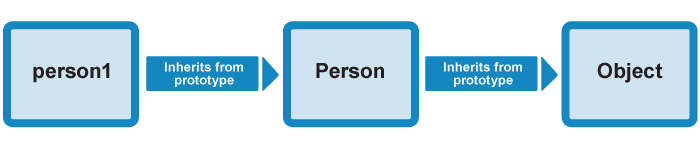
- In our code we define the constructor, then we create an instance object from the constructor, then we add a new method to the constructor's prototype:
function Person(first, last, age, gender, interests) {
  // property and method definitions
}

let person1 = new Person('Tammi', 'Smith', 32, 'neutral', ['music', 'skiing', 'kickboxing']);

Person.prototype.farewell = function() {
  alert(this.name.first + ' has left the building. Bye for now!');
};
- But the farewell() method is still available on the person1 object instance — its members have been automatically updated to include the newly defined farewell() method.
OOP: Instantiating Multiple Objects
- To be more OOP-like, we need
- Differentiation between class and object
- Instantiating via constructor
- Traditional/Base/Conceptual/Common approach:
- A function is also a type of object
- Functions are used to define objects as the constructor
- Inheritance is
implemented
by
prototypeproperty of the function
- Easier/New (ECMA 2015) approach:
- No new concept, syntactical sugar over JavaScript's existing prototype-based inheritance
- Classes
are defined by
class, which is a special function - Common OOP terminologies:
extends,super, ... - Since ES2022 a class body may also declare fields directly, not just methods
Objects
- Object instantiation:
new - property deletion:
delete - Access to properties/methods:
. - This object:
this - Needed to access properties in methods
What does new Foo(...) do?
- A new object is created, inheriting from
Foo.prototype - The constructor function
Foois called with the specified arguments, and withthisbound to the newly created object.
ECMA 2015
- Class definition:
class - Properties declaration (optional)
- Method declaration: function definition
without
function
- Private members: prefix the name with
#(ES2022, supported everywhere)
class Student {
  name;              // public field
  #id;               // private field — not reachable from outside

  constructor(name, id) {
    this.name = name;
    this.#id = id;
  }

  #check() {         // private method
    return this.#id.length === 7;
  }

  get id() {
    return this.#check() ? this.#id : "invalid";
  }
}

const s = new Student("Parham", "9231058");
s.#id; // SyntaxError: Private field '#id' must be declared in an enclosing class
protected in JavaScriptstatic- This class:
constructor - Parent:
super
Objects Example
function Student(name, id){
  window.alert("I am going to create a new student");
  this.name = name;
  this.id = id;
  this.toString = function(){
    return `${this.name}: ${this.id}`;
  }
}

let st1 = new Student("Parham Alvani", "9231058");
console.log(st1);
class Student {
  constructor(name, id){
    window.alert("I am going to create a new student");
    this.name = name;
    this.id = id;
  }
  toString() {
    return `${this.name}: ${this.id}`;
  }
}

let st1 = new Student("Parham Alvani", "9231058");
console.log(st1);
Objects Example
class Bachelor extends Student {
  constructor(name, id){
    super(name, id);
    this.average = function() {
      return 20;
    }
  }

  isPass(){
    return 'Pass';
  }

  static betterThan(a, b){
    return a.average() >= b.average();
  }
}

bc1 = new Bachelor("Parham Alvani", "9231058");
console.log(bc1.average());

bc2 = new Bachelor("Sepehr Sabour", "9231011");
console.log(bc2.average());

console.log(Bachelor.betterThan(bc1, bc2));
Use Strict
- The
"use strict"directive was new in ECMAScript version 5. - It is not a statement, but a literal expression, ignored by earlier versions of JavaScript.
- Strict mode makes it easier to write "secure" JavaScript.
- Strict mode changes previously accepted "bad syntax" into real errors.
- Strict mode is declared by adding
"use strict"; to the beginning of a script or a function.
Not Allowed in Strict Mode
- Using a variable, without declaring it, is not allowed.
- Deleting a variable (or object) is not allowed.
- Deleting a function is not allowed.
- Duplicating a parameter name is not allowed.
- Octal numeric literals are not allowed.
- Writing to a get-only property is not allowed.
- Keywords reserved for future JavaScript versions can NOT be used as variable names in strict mode.
"use strict";
myFunction();

function myFunction() {
  y = 3.14;   // This will also cause an error because y is not declared
}
Concurrency model and the event loop
JavaScript has a concurrency model based on an event loop, which is responsible for executing the code, collecting and processing events, and executing queued sub-tasks.
Stack
Function calls form a stack of frames.
Heap
Objects are allocated in a heap which is just a name to denote a large (mostly unstructured) region of memory.
Queue
A JavaScript runtime uses a message queue, which is a list of messages to be processed. Each message has an associated function which gets called in order to handle the message.
Event Loop
- The event loop got its name because of how it's usually implemented, which usually resembles:
while (queue.waitForMessage()) {
  queue.processNextMessage()
}
- Each message is processed completely before any other message is processed.
- This offers some nice properties when reasoning about your program, including the fact that whenever a function runs, it cannot be pre-empted and will run entirely before any other code runs (and can modify data the function manipulates).
- A downside of this model is that if a message takes too long to complete, the web application is unable to process user interactions like click or scroll.
Zero Delays
- Zero delay doesn't actually mean the call back will fire-off after zero milliseconds.
- Calling setTimeout with a delay of 0 (zero) milliseconds doesn't execute the callback function after the given interval.
(function () {
  let el = document.getElementById("event-loop");

  el.innerHTML += "this is the start<br />";

  setTimeout(function cb() {
    el.innerHTML += "Callback 1: this is a msg from call back<br />";
  }); // has a default time value of 0

  el.innerHTML += "this is just a message <br />";

  setTimeout(function cb1() {
    el.innerHTML += "Callback 2: this is a msg from call back<br />";
  }, 0);

  el.innerHTML += "this is the end<br />";
})();
Never Blocking
- A very interesting property of the event loop model is that JavaScript, unlike a lot of other languages, never blocks.
- Handling I/O is typically performed via events and callbacks, so when the application is waiting for an IndexedDB query to return or an XHR request to return, it can still process other things like user input.
Promise
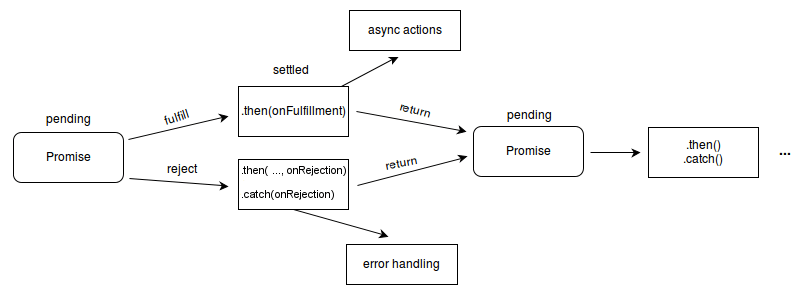
- The Promise object represents the eventual completion (or failure) of an asynchronous operation and its resulting value.
- A
Promiseis in one of these states: - pending: initial state, neither fulfilled nor rejected.
- fulfilled: meaning that the operation was completed successfully.
- rejected: meaning that the operation failed.
- A pending promise can either be fulfilled with a value or rejected with a reason (error).
- When either of these options happens, the associated handlers queued up by a promise's then method are called.
- The
.then()method takes up to two arguments; the first argument is a callback function for the resolved case of the promise, and the second argument is a callback function for the rejected case.
// timeout is 300 millisecond
const timeout = 300;

function longCalculation(id) {
  return new Promise((resolve, reject) => {
    setTimeout(() => {
      resolve(`resolved-${id}`);
    }, timeout);
  });
}

longCalculation(1)
  .then((result) => {
    console.log(`1st promise: ${result}`);
    return longCalculation(2);
  })
  .then((result) => {
    console.log(`2nd promise: ${result}`);
    return longCalculation(3);
  })
  .then((result) => {
    console.log(`3rd promise: ${result}`);
    return;
  });
async / await
- Chaining
thenreads backwards once there are more than two steps asyncandawaitlet you write the same promises as if they were sequential codeawaitpauses only the function it is in, never the browser
The Same Chain
async function run() {
  const first = await longCalculation(1);
  console.log(`1st promise: ${first}`);

  const second = await longCalculation(2);
  console.log(`2nd promise: ${second}`);

  const third = await longCalculation(3);
  console.log(`3rd promise: ${third}`);
}
- An
asyncfunction always returns a promise
Errors
- A rejected promise becomes a thrown exception, so ordinary
try/catchworks
async function load() {
  try {
    const response = await fetch("https://swapi.dev/api/people/1/");
    if (!response.ok) {
      throw new Error(`unexpected status: ${response.status}`);
    }
    return await response.json();
  } catch (error) {
    console.error(error);
  }
}
Waiting in Parallel
- Two
awaits in a row run one after the other - When the calls do not depend on each other, start them first and await together
// 600ms: the second starts only after the first resolves
const a = await longCalculation(1);
const b = await longCalculation(2);

// 300ms: both are already running
const [c, d] = await Promise.all([longCalculation(3), longCalculation(4)]);
Optional Chaining
- Reading a property of
undefinedthrows, so deep access needs a guard at every level ?.stops and evaluates toundefinedinstead of throwing
// before
const city1 = user && user.address && user.address.city;

// after
const city2 = user?.address?.city;
Nullish Coalescing
||replaces every falsy value, which eats0and the empty string??only replacesnullandundefined
const count = 0;

count || 10; // 10, almost certainly a bug
count ?? 10; // 0, the value we actually have
Modules
- Scripts share one global scope, so every name can collide with every other file
- A module has its own scope, and states what it exposes and what it needs
// calculation.js
export const timeout = 300;

export function longCalculation(id) {
  return new Promise((resolve) =>
    setTimeout(() => resolve(`resolved-${id}`), timeout),
  );
}
Importing
// main.js
import { longCalculation, timeout } from "./calculation.js";

console.log(await longCalculation(1), timeout);
- In the browser a module needs
type="module" - Modules are deferred by default, and
awaitworks at the top level
<script type="module" src="main.js"></script>
JavaScript in Web
- Basic functionality of JS in Web: Dynamic pages
- Create and delete HTML elements
- Modify HTML element contents
- Modify element's styles
- Question: How to access HTML elements from JavaScript?
- Answer: DOM
- Web browser parses HTML document
- Output is a data-structure called "DOM"
- Browser provides API to access the DOM
DOM
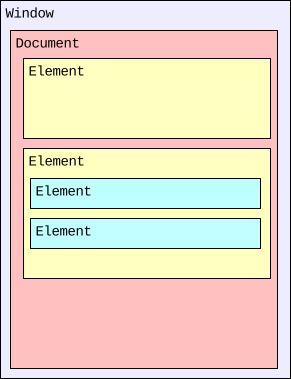
- Document Object Model (DOM) is the output of parsing HTML file by browser
- HTML document is represented by DOM in browser
- Each HTML element is represented by an object
- However, there are other objects (called BOM) that are not
corresponding to HTML elements; e.g.,
windowis the browser window - A tree of object corresponding to HTML tag hierarchy
- Each object has
- Properties corresponding to HTML properties (not all properties)
- Methods corresponding to events and actions
DOM & JavaScript
- JavaScript is powerful in web since it accesses to DOM
- JavaScript + DOM = Dynamic HTML
- Read access in order to
- Check properties (conditional reaction)
- Validate inputs
- Handle events
- Write access in order to
- Modify content
- Modify styles
- Add/Remove objects to/from DOM
DOM Object Access by Name
<form name="nametest">
<input name="output" type="text" value="Default Text">
</form>
document.nametest.output.value='New Value';
- We need to assign a name to all parents & children
- Is not really useful and practical
DOM Object Access
element.getElementById("id")- returns the object with given "id" in sub-tree rooted at element
element.getElementsByClassName("classname")- returns a live HTMLCollection of the elements whose class is "classname" in the sub-tree rooted at element
element.getElementsByTagName("tagname")- returns a live HTMLCollection of the elements whose tag is "tagname" in the sub-tree rooted at element
element.getElementsByName("name")- returns a live NodeList of the elements whose name is "name" in the sub-tree rooted at element
element.querySelector("CSS Selector")- returns the first element matches the CSS selector in sub-tree rooted at element
- Element must already exist — the browser reads the HTML file top to bottom
HTMLCollectionandNodeListare not arrays: nomap, nofilter. Convert first
const items = Array.from(document.getElementsByClassName("testbox"));
items.map((el) => el.textContent);

// querySelectorAll returns a NodeList, which does have forEach
document.querySelectorAll(".testbox").forEach((el) => console.log(el));
Access to DOM Objects Example
<div id="box1">
<div class="testbox">
document.getElementById("box1").innerHTML="I am the new message"
let da = document.getElementsByClassName("testbox");
da[0].innerHTML="I am another new message";
Samples of DOM Object's Properties
- Element.
innerHTML - HTML or XML markup contained within the element
- Setting the value of innerHTML removes all of the element's descendants and replaces them with nodes constructed by parsing the HTML given in the value.
- Element.
className - Is a String representing the class of the element.
document.getElementById("My_Element").className += " My_Class";
children- Array of children elements
parentNode- The parent of element
- HTMLElement.
style - The styling rules of element
- HTMLElement.
value - The value of input elements
CSS & JavaScript
- (Most) objects (document's children) have
styleproperty - CSS style properties of each object are the properties of
style - CSS and DOM use different name (syntax) for the same style. E.g., Background color:
- In CSS:
background-color - In DOM:
backgroundColor - To access a CSS style property in JavaScript:
object.style.PropertyNameInDOMCSS & JavaScript Example
let color;
index = prompt("Enter 1 for blue, 2 for red, 3 for green");
switch(parseInt(index)) {
  case 1:
    color = "blue"; break;
  case 2:
    color = "red"; break;
  case 3:
    color = "green"; break;
  default:
    color = "black"; break;
}

document.getElementById("colorBox").style.backgroundColor = color;
Events
- Okay, JS can make page dynamic
- But, why would a page be dynamic?
- Because some events happened in the page
- Client does something; e.g., click on button
- There is a periodical update; e.g., check for new emails
- New content is received from server; e.g., chat message
- Who does know what happened? Browser
- Browser runs a JS code for each event (which is usually an empty function)
- How does browser know which function should be called?
- JS has to register itself for the event!
Events & Their Handling (in more details)
- There are many predefined events in browsers
- Mouse click
- Key press
- ...
- These events occur on an element: e.g., mouse click on a button
- Not all elements have all events
- DOM Objects have event handler methods
- Event handler is called by browser when event occur on object
- E.g.,
onclickis called when object (html element) is clicked - Most event handlers are empty by default
Event Handling in JavaScripts
- To do somethings when an event occurs
- The event handling
- Override the corresponding event handler
- In HTML, using element attribute
<tag onclick="// JavaScript code, or a call to function()">
object.onclick=function
Sample Events
| Event | Occurs when... |
|---|---|
| onabort | a user aborts page loading |
| onblur | a user leaves an object |
| onchange | a user changes the value of an object |
| onclick | a user clicks on an object |
| ondblclick | a user double-clicks on an object |
| onfocus | a user makes an object active |
| onkeydown | a keyboard key is on its way down |
| onkeypress | a keyboard key is pressed |
| onkeyup | a keyboard key is released |
| onload | a page is finished loading. |
| onmousedown | a user presses a mouse-button |
| onmousemove | a cursor moves on an object |
| onmouseover | a cursor moves over an object |
| onmouseout | a cursor moves off an object |
| onmouseup | a user releases a mouse-button |
| onreset | a user resets a form |
| onselect | a user selects content on a page |
| onsubmit | a user submits a form |
| onunload | a user closes a page |
JavaScript Event Handling Example
<input
  id="clickbtn"
  type="button"
  value="click"
  onmouseover="document.getElementById('msg').innerHTML='Click Here'"
  onmouseout="document.getElementById('msg').innerHTML='Outside! Clicks are ignored'"
  onmousedown="mouseDown()"
/>
<div id="msg" style="width: 50%"></div>
<script type="text/javascript">
  let counter = 0;
  function mouseDown() {
    counter++;
    document.getElementById("msg").innerHTML = "A new click";
  }

  function mouseUp() {
    window.alert("Total # of clicks =  " + counter);
  }
  document.getElementById("clickbtn").onmouseup = mouseUp;
</script>
How to Pass Inputs to Event Handlers?
- It is easy when the handler is registered in HTML
function setBgColor(color) {
  document.getElementById('change-my-color').style.backgroundColor = color;
}
<button onclick="setBgColor('red')">Red</button>
<button onclick="setBgColor('green')">Green</button>
- Find out the required information (specially when the handler is registered in JS)
color: <input type="text" id="color" />
<button id="set">set</button>
function setBgColor2() {
  document.getElementById('change-my-color-2').style.backgroundColor =
  document.getElementById("color").value;
}
document.getElementById("set").onclick = setBgColor2;
How to Pass Inputs to Event Handlers (Cont.)?
- Use
thisonly when the handler is registered in JS
function setBgColor3() {
  window.alert("this = " + this);
  this.style.backgroundColor = this.innerHTML.toLowerCase();
}

document.getElementById("r").onclick = setBgColor3;
document.getElementById("b").onclick = setBgColor3;
<button id="r">Red</button>

<button id="b">Blue</button>

<button onclick="this.style.backgroundColor =
this.innerHTML;">Green</button>

<!-- how we can fix this? -->
<button onclick="setBgColor3();">Black</button>
<button onclick="setBgColor3.bind(this)();">Black</button>
Dynamic Event Handler Registration
- Remark, event handlers can be registered by JavaScript
object.onclick = function
- Assign multiple event handlers
- Reset event handler to default
object.addEventListener(eventName, function)
object.removeEventListener(eventName, function)
Dynamic Event Handler Example
<button onclick="AddEventHandler();">
  Add a 'click' event listener to the blue button
</button>

<button onclick="RemoveEventHandler();">Remove the event listener</button>

<button id="blueButton" style="background-color: #0077ff">Big Blue Button</button>

<script type="text/javascript">
  function blueClick1() {
    alert("You have clicked on me!!!");
  }

  function blueClick2() {
    alert("Yahoooo!!!!");
  }

  function AddEventHandler() {
    let blueButton = document.getElementById("blueButton");
    blueButton.addEventListener("click", blueClick1);
    blueButton.addEventListener("click", blueClick2);
  }

  function RemoveEventHandler() {
    let blueButton = document.getElementById("blueButton");
    blueButton.removeEventListener("click", blueClick1);
  }
</script>
Event Propagation & the event object
- What happen if both parent and child handle the same event?!
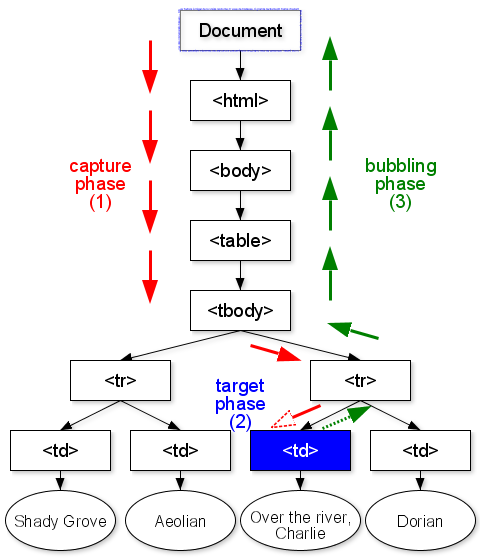
- The event is said to propagate outward, from the node where it happened to that node’s parent node and on to the root of the document.
- By default, the event object is passed to all event handler
- At any point, an event handler can call the
stopPropagationmethod on the event object to prevent handlers further up from receiving the event.
<div id="parent" style="border: solid">
  I am parent <br />
  <button id="click-btn-1">click me</button>
</div>
// counter have been declared before
counter = 0;
function childHandler(event) {
  window.alert("child handler");
  counter++;
  // add message to the event
  event.message = `You have clicked me ${counter} times`;
}

document
  .getElementById("click-btn-1")
  .addEventListener("click", childHandler);

document.getElementById("parent").addEventListener("click", (event) => {
  window.alert(
    `child message that is added into event: ${
      event.message ?? "use clickme button"
    }`
  );
});
HTML Attribute
<button onclick="alert('Hello world!')">
The JavaScript code in the attribute is passed the Event object via the
event parameter.
DOM element properties
// Assuming myButton is a button element
myButton.onclick = function(event){alert('Hello world')}
The function can be defined to take an
event parameter.
- The Event interface represents an event which takes place in the DOM.
Event.targetA reference to the target to which the event was originally dispatched.Event.typeThe name of the event. Case-sensitive —addEventListener("Click", …)never fires.
event.target vs.
this
- There is a difference between this and event.target, and quite a significant one.
- this always refers to the DOM element the listener was attached to
- event.target is the actual DOM element that was clicked
Application 1: Dynamic Element Generation
- Add/Remove objects to/from DOM using JavaScript
- Create an element
document.createElement(tagName)
element.getAttribute(name)
element.setAttribute(name, value)
- Append & Insert the new element as a child of parent
parent.appendChild(child)
parent.insertBefore(newChild, existingChild)
parent.removeChild(child)
parent.replaceChild(newChild, oldChild)
Content Generation Example
let id = 0;
function addNewP() {
  id++;
  let parent = document.getElementById("main");
  let newp = document.createElement("p");
  newp.id = "newp" + id;
  newp.innerHTML = "I am new paragraph";
  parent.appendChild(newp);
}
let replace = 0;
function replaceNewP() {
  replace++;
  if (replace <= id) {
    let parent = document.getElementById("main");
    let newp = document.getElementById("newp" + replace);
    let newer = document.createElement("span");
    newer.style.borderStyle = "solid";
    newer.innerHTML = "I replace the new paragraph";
    parent.replaceChild(newer, newp);
  } else {
    replace = id;
  }
}
Application 2: Form Validation
- One of the major applications of JavaScript: Form Validation
- To check input data correctness before submitting to server
- To save bandwidth, time, and server load
- Note: Data cannot be validated completely in client-side
- In client side we check format (pattern/syntax)
- Checking format, e.g., Date or Time pattern
- Checking length, e.g. Password length
- Steps:
- Read the input
- Check the format/pattern (by regular expression)
- Don't allow to submit if there is an error
Form Validation in JavaScript
- At first, we should access to input (form) data, then validate
- For
text,password, andtextarea - The input text is accessible via
.valueof the corresponding object - For
select - The value of selected
optionis given bySelectObject.value - For
checkboxandradio - Enumerate all options (children)
.checked == trueis selected- The value of the selected child is given by its
.value
Output will be here:
function upperCaseArea(textareaID, outputID) {
  return () => {
    let textareaObject = document.getElementById(textareaID);
    let content = textareaObject.value.toUpperCase();
    let outputObject = document.getElementById(outputID);

    // textContent, not innerHTML: the input came from the user and must
    // never be parsed as markup. See the Web Security lecture.
    outputObject.textContent = content;
  };
}

document.getElementById("btnID").onclick = upperCaseArea("txtID", "outID");
JavaScript Form Validation Example
function findOS(inputCheckBoxs, Outputdiv) {
  let boxes = document.getElementsByName(inputCheckBoxs);
  let outputMessage = "Ok, you are master in ";
  for (let i = 0; i < boxes.length; i++) {
    if (boxes[i].checked) outputMessage += " " + boxes[i].value + ", ";
  }
  document.getElementById(Outputdiv).innerHTML = outputMessage;
}
Form Validation by Regular Expression
reg_expr = /expression/;

// The test() method executes a search for a match between a regular expression and a specified string.
// Returns true or false.
reg_expr.test(string)

// The match method retrieves the matches when matching a string against a regular expression.
string.match(reg_expr)
c* | ≥ 0 of c | c+ | ≥ 1 of c |
c? | 0 or 1 of c | c{x} | x times of c |
. | A char (no new line) | c1|c2 | c1 or c2 |
[] | Any combination of given characters | [^] | Any string without the given characters |
\d | A digit | \D | Every thing except digits |
^c | Beginning match | c$ | End match |
// anchored: the whole string must match
let anchored = /^ab*c+d{3}z$/;
// "acz": False
// "abbccdddz": True
// "ffabbccdddz": False

// unanchored: a match anywhere in the string is enough
let anywhere = /ab*c+d{3}z/;
// "abbccdddz": True
// "ffabbccdddz": True
// "ffabbccdddzggg": True

// To match Date format:
let dateRegex = /^\d{4}\/\d{1,2}\/\d{1,2}$/
Valid Form Submission
function checkpassword(event) {
  const p1 = document.passwordform.password.value;
  const p2 = document.passwordform.repassword.value;

  if (p1.length < 6) {
    alert("Password is too short, re-enter");
    event.preventDefault();
  } else if (p1 !== p2) {
    alert("The two passwords do not match");
    event.preventDefault();
  }
  // otherwise the browser goes ahead and submits
}
document.getElementsByName("passwordform")[0].onsubmit = checkpassword;
Event.preventDefault
The Event interface's preventDefault() method tells the user agent that if the event does not get explicitly handled, its default action should not be taken as it normally would be.
Toggling a checkbox is the default action of clicking on a checkbox.
document.querySelector("#id-checkbox").addEventListener("click", function(event) {
  document.getElementById("output-box").innerHTML += "Sorry! <code>preventDefault()</code> won't let you check this!<br>";
  event.preventDefault();
});
<p>Please click on the checkbox control.</p>

<form>
  <label for="id-checkbox">Checkbox:</label>
  <input type="checkbox" id="id-checkbox"/>
</form>

<div id="output-box"></div>
Please click on the checkbox control.
HTML Validator
Application 3: Working with Document
documentobject is created by browser for each HTML page (document) that is viewed- Its properties provide useful information to read/write about the HTML document
anchors, forms, images,
links, scripts | Array of different types of HTML elements |
body | The object corresponding to <body> |
dir | Document direction |
title | Title of the document |
cookie, location, domain, ... | Information about HTTP |
Document Object Example
من یک متن فارسی هستم
Application 4: Working with Browser
- The
windowobjects provide useful properties and methods to work with browser window - Properties to access browser window size
- Methods & properties to work browser history
- Method to open/close/change browser window
- Method to run periodic functions
window Object
- The
windowobject is created for each window/tab that appears on the screen - Major properties
document | This is the document object (that we have seen) |
history | Provides information on the browser history of the current window; method to go forward and backward in the history |
*Height *Width | Height & width of window or screen |
location | URL of the window |
window Properties
- Window Size (in pixel)
- Please resize to see what happens
- Zoom in/out decreases/increases height/width because it makes pixels bigger/smaller
- History length:
- Location:
screen.height: | screen.width: | ||
screen.availHeight: | screen.availWidth: | ||
outerHeight: | outerWidth: | ||
innerHeight: | innerWidth: |
let tooSmall = 0;
let content;

window.onresize = function () {
  console.log(`new window ${window.innerWidth} x ${window.innerHeight}`);
  console.log(`small: ${tooSmall}`);

  if (
    tooSmall == 0 &&
    (window.innerHeight < 250 || window.innerWidth < 500)
  ) {
    tooSmall = 1;
    let el = document.getElementsByName("window-properties")[0];
    if (el != null) {
      content = el.innerHTML;
      el.innerHTML = "";

      msg = document.createElement("h1");
      msg.innerHTML = "The window is too small, please resize!!!";
      el.appendChild(msg);
    }
  }

  if (
    tooSmall == 1 &&
    window.innerHeight >= 250 &&
    window.innerWidth >= 500
  ) {
    tooSmall = 0;
    document.getElementsByName(
      "window-properties"
    )[0].innerHTML = content;
  }
};
window Object Methods
forward(), back() | One time forward or back in history |
stop(), close() | Stop page loading or close it |
open() | Create new window |
Alert "Hello" every 3 seconds (3000 milliseconds)
let hello = setInterval(() => alert("Hello"), 3000);
clearInterval(hello)
Alert "Hello" after 3 seconds (3000 milliseconds)
let hello = setTimeout(() => alert("Hello"), 3000);
clearTimeout(hello)
navigator Object
- Checking browser software
navigator- Properties to read browser characteristic
appCodeName: | |
appName: | |
appVersion: | |
language: | |
platform: | |
userAgent: |
Application 5: JavaScript Access to Cookies
- Saving client preferences
- Remark: Cookie is a solution for HTTP statelessness problem
- Server sets cookies on first connection: name=value
- Client returns back the cookies in subsequent communications
- Server knows who the client is and provides its state
- Cookies can be used by JavaScript as small storage in client side!
- because browser
- stores & loads them automatically
- provides API to access them by JS
- Note: disrespect of originator, cookies are sent to server automatically!
JavaScript Access to Cookies
- All cookies (set by server or JS itself) are accessible by JavaScript
- Except the cookies with
httpOnlyattribute - Extremely easy approach to read or write cookies
- Cookies are saved in
document.cookieas a string - To add a cookie, set "name=value" string in
document.cookie - To read a cookie, parse
document.cookie - Note: Chrome by default ignores cookies set by file schema.
Local Storage
- The
window.localStorageobject stores the data with no expiration date. - Name/value pairs are always stored as strings. Remember to convert them to another format when needed
// store
localStorage.setItem("lastname", "Smith");

// retrieve
document.getElementById("result").innerHTML = localStorage.getItem("lastname");

// remove
localStorage.removeItem("lastname");
Session Storage
- The
window.sessionStorageobject is equal to the localStorage object, except that it stores the data for only one session. - The data is deleted when the user closes the specific browser tab.
Application 6: Fetch
- The
Fetch APIprovides a JavaScript interface for accessing and manipulating parts of theHTTP pipeline, such as requests and responses. - It also provides a global
fetch()method that provides an easy, logical way to fetch resources asynchronously across the network.
- The
fetch()method takes one mandatory argument, the path to the resource you want to fetch. - It returns a
Promisethat resolves to the Response to that request, whether it is successful or not.
fetch('http://example.com/movies.json')
  .then(response => response.json())
  .then(data => console.log(data));
- Here we are fetching a JSON file across the network and printing it to the console.
- The simplest use of fetch() takes one argument — the path to the resource you want to fetch — and returns a promise containing the response (a Response object).
- This is just an HTTP response, not the actual JSON.
- To extract the JSON body content from the response, we use the json() method (defined on the Body mixin, which is implemented by both the Request and Response objects.)
fetch('flowers.jpg')
  .then(response => {
    if (!response.ok) {
      throw new Error('Network response was not ok');
    }
    return response.blob();
  })
  .then(myBlob => {
    myImage.src = URL.createObjectURL(myBlob);
  })
  .catch(error => {
    console.error('There has been a problem with your fetch operation:', error);
  });
- A fetch() promise will reject with a TypeError when
- a network error is encountered
- CORS is misconfigured
- The ok read-only property of the Response interface contains a Boolean stating whether the response was successful (status in the range 200-299) or not.
function swapiExec() {
  fetch("https://swapi.dev/api/people/1/")
    .then((resp) => resp.json())
    .then(
      (data) =>
        (document.getElementById(
          "swapi-result"
        ).textContent = JSON.stringify(data))
    )
    .catch(
      (err) =>
        (document.getElementById("swapi-result").textContent =
          `could not reach the web service: ${err.message}`)
    );
}
Waiting...
function wikiSWLogo() {
  fetch(
    "https://upload.wikimedia.org/wikipedia/commons/thumb/6/6c/Star_Wars_Logo.svg/330px-Star_Wars_Logo.svg.png"
  )
    .then((resp) => resp.blob())
    .then((content) => {
      let img = document.createElement("img");
      img.src = URL.createObjectURL(content);
      document
        .querySelector("section.present > section.present")
        .appendChild(img);
    })
    .catch((err) => {
      let msg = document.createElement("p");
      msg.textContent = `could not reach Wikimedia: ${err.message}`;
      document
        .querySelector("section.present > section.present")
        .appendChild(msg);
    });
}
function fetchWithErr(url) {
  fetch(url)
    .then((response) => {
      if (!response.ok) {
        throw new Error(
          "Network response was not ok, " + response.status
        );
      }
      return response.text();
    })
    .then((content) => {
      document.getElementById(
        "errMessage"
      ).innerHTML += `Success: <code class="hl-orange">${content}</code><br />`;
    })
    .catch((error) => {
      document.getElementById(
        "errMessage"
      ).innerHTML += `There has been a problem with your fetch operation: <code class="hl-red">${error}</code> <br />`;
    });
}
JavaScript in Action with an Email Client
- Add new item per new received email
document.createElement(), parent.appendChild()- Check email format when composing
regex.test(input.value())- Information about HTTP (e.g., HTTP or HTTPS?)
document.property corresponding to HTTP headers- Hide some elements when browser window is small
window.*.height/width
- Do something periodically (e.g., checking emails)
window.setInterval()- Redirect to other pages
window.location- Check browser software (e.g., to recommend better one)
navigator.userAgent/appVersion/...- Save client preferences (e.g., remember me, theme, ...)
document.cookie
Debugging 🐛
- Use the DOM tab to find methods & properties
- Basic debugging via console,
console.log()/info()/warn()/error() - Advanced debugging via real debuggers; e.g., FireFox debugger
- Best Practices
- Avoid Global Variables
- Always Declare Local Variables
- Beware of Automatic Type Conversions
- Use === Comparison
- Use powerful IDEs for development
Warnings ⚠️
- JavaScript is a big, complex language
- It's easy to get started in JavaScript, but if you need to use it heavily, must invest more time in learning it well
- JavaScript is not totally platform independent
- Expect different browsers to behave differently
- this is a bit confusing!
thisrefers to whatever the function was called on, not to where it was written — inside a plain function call it isundefinedin strict mode and modules, and thewindowobject otherwise
What next?!
- JavaScript Libraries
- To make life easier
- D3, Lodash, Zod, TanStack Query, ...
- JavaScript Frameworks
- To make life easier even more
- React, Vue, Svelte, Angular, Solid, ...
- and on top of them: Next.js, Nuxt, SvelteKit, Astro
- JavaScript server-side programming!!!
- Runtimes: Node.js, Deno, Bun
- Servers: Express, Fastify, Hono, Socket.IO
What next?!
- Other languages: TypeScript
- Object oriented
- Static typing
- Supports modules and interfaces
- Transpiled into JavaScript
- Safe in complex large applications
- Other languages: C, C++, ... 😱
- Set of tool-chains (compiler, library, VM, ...) to run other languages in client side
- asm.js and WebAssembly
- High performance