Gopher



Go is
- Modern
- Generic Purpose
- Open Source
Programming Language
- Officially announced at November 10, 2009
- It began as an internal Google project
- The designers were primarily motivated by their shared dislike of C++
- Its spiritual fathers are
- Robert Griesemer
- Ken Thompson
- Rob Pike
- version 1.0 was released in March 2012.
- Go is widely used in production at Google and in many other organizations and open-source projects.
- Lack of support for generic programming and the verbosity of error handling in Go 1.x had drawn considerable criticism.

- Go is syntactically similar to C, but with memory safety, garbage collection, structural typing, and CSP-style concurrency.
- There are two major implementations:
- Google's self-hosting compiler toolchain targeting multiple operating systems, mobile devices, and WebAssembly.
- gccgo, a GCC frontend.
memory safety
int a[10];
a[11] = 10;
garbage collection
void allocate_forever(void) {
  int *a = malloc(10 * sizeof(int));
  a[0] = 10;
}
structural typing
struct student {
  int  id;
  char surname[255];
  char forename[255];
};
- Go code is easy to read and easy to understand
- Go does not have a preprocessor
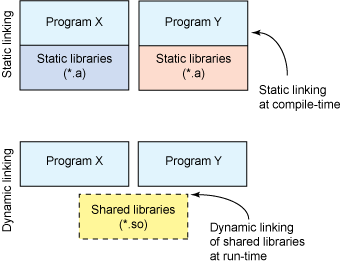
- Go uses static linking by default, which means that the binary files produced can be easily transferred to other machines with the same OS.
preprocessor
#define students_foreach_loop(stds, element) \
    struct students_el *element ## _el = stds->head; \
    const struct student *element = element ## _el->student; \
    for (; element ## _el != NULL; element ## _el = element ## _el->next, element = element ## _el ? element ## _el->student : NULL)

  students_foreach_loop(stds, el) {
    fprintf(fp, "Name: %s\n", el->name);
    fprintf(fp, "ID: %s\n", el->id);
    fprintf(fp, "\n");
  }
- A syntax and environment adopting patterns more common in dynamic languages:
- Optional concise variable declaration and initialization through
type inference (
x := 0instead ofint x = 0;). - Fast compilation.
- Remote package management (
go get) and online package documentation.
- Distinctive approaches to particular problems:
- Built-in concurrency primitives:
light-weight processes (goroutines), channels, and the
selectstatement. - An interface system in place of virtual inheritance, and type embedding instead of non-virtual inheritance.
- A toolchain that, by default, produces statically linked native binaries without external dependencies.
- A desire to keep the language specification simple enough to hold in a programmer's head, in part by omitting features that are common in similar languages.

package main

import "fmt"

func main() {
  fmt.Printf("Hello, دنیا\n")
}
- Go code is organized into packages, which are similar to libraries or modules in other languages.
- The
importdeclaration must follow thepackagedeclaration. - You must import exactly the packages you need.
- A function declaration consists of the keyword
func, the name of the function, a parameter list (empty for main), a result list (also empty here), and the body of the function - the statements that define what it does - enclosed in braces.
<Code Time.go>
- Write Hello World in Go but Before that we must install the Go! and our favorite text editor
Tip!
- Use
Code Time.golinks to see the source code - Use
curlto download the source code
curl https://raw.githubusercontent.com/1995parham-teaching/go-lecture/main/00-hello-world/main.go > hello-world.go
- https://go.dev/learn/
- https://go.dev/ref/spec
- with package managers
- ArchLinux:
pacman -Syu go - Ubuntu/Debian:
apt install golang-go - Ubuntu:
sudo snap install go --classic - macOS:
brew install go - Windows:
scoop install go
Constants
Maintained precisely:
const e = 2.71828182845904523536028747135266249775724709369995957496696763

// careful: both operands are untyped *integer* constants, so this is 0
const wrong = 1 / 3
// one float operand is enough to make it a float constant
const third = 1.0 / 3
Typed or without type:
const M64 int64 = 1<<20
const M = 1<<20
Evaluated at compile-time:
const big = 1<<100 / 1e30 // valid constant expression
Variables
var
name
type =
expression
name
:=
expression
// inside functions only
Statically typed:
var x int
var s, t string
Implicitly or explicitly initialized:
var x int                       // x = 0
var s, t string = "foo", "bar"  // multiple assignment

var x = 42                      // int
var s, b = "foo", true          // string, bool
Short variable declaration:
x := 42
s, b := "foo", true
Pointers ⚰️
- A pointer value is the address of a variable.
- Not every value has an address, but every variable does.
- With a pointer, we can read or update the value of a variable indirectly
x := 1
p := &x     // p, of type *int, points to x
fmt.Println(*p) // 1
*p = 2          // equivalent to x = 2
fmt.Println(x)  // 2
Predeclared Name
which can be reused
true false iota nil
int int8 int16 int32 int64
uint uint8 uint16 uint32 uint64 uintptr
float32 float64 complex128 complex64
bool byte rune string error
make len cap new append copy close delete
complex real imag
panic recover
which can't be reused
break default func interface select
case defer go map struct
chan else goto package switch
const fallthrough if range type
continue for import return var
<Code Time.go>
- Let's define variables and constants to see how they work
Calculation
x := 42
y := x + 10
var c = (f - 32) * 5 / 9

var x uint8 = 1 << 1 | 1 << 5
var y uint8 = 1 << 1 | 1 << 2

fmt.Printf("%08b\n", x) // "00100010"
fmt.Printf("%08b\n", y) // "00000110"

fmt.Printf("%08b\n", x&y) // "00000010"
fmt.Printf("%08b\n", x|y)     // "00100110"
fmt.Printf("%08b\n", x^y)     // "00100100"
<Code Time.go>
- Do some math
The new Function
- Another way to create a variable is to use the built-in function
new - The expression
new(T)create an unnamed variable of type T, initializes it to the zero value of T, and return its address, which is a value of type *T - The new function is relatively rarely used.
func newInt() *int {
  return new(int)
}

// the same thing, written out
func newIntLongWay() *int {
  var dummy int
  return &dummy
}
Assignment
- Tuple Assignment
- Allows several variables to be assigned at once.
- All of the right-hand side expressions are evaluated before any of the variable are updated.
// tuple assignment

a, b = b, a // swap

f, err = os.Open(filename) // multiple assignment

func gcd(x, y int) int {
  for y != 0 {
    x, y = y, x % y
  }

  return x
}
Statements
- Curly braces (C style)
- Multiple assignments and some other new constructs
- Statements are not Expressions.
- Many cleanups 🧹:
- mandatory braces
- no parentheses for conditionals
- implicit break in switches
- no semicolons
- ...
Statements
if x < y {
  return x
} else {
  return y
}

switch day {
case Mon:
  ...
  // break is implicit
case Tue, Wed:
  ...
}
- Not shown: break, goto, continue, fallthrough
Statements
- Unified
forsyntax
// a traditional infinite loop
for {
  // ...
}
for initialization; condition; post {
  // zero or more statements
}
// a traditional "while" loop
for condition {
  // ...
}
rangeover arrays, slices, and maps- In each iteration of the loop,
rangeproduces a pair of values: the index and the value of the element at that index. - If you don't want the index variable you can use the blank identifier, whose name is _ (that is, an underscore).
for i, num := range numbers { ... }
for city, pop := range population { ... }
Functions
package main

import "fmt"

func Fibonacci(n int) int {
  if n == 0 || n == 1 {
    return 1
  } else {
    return Fibonacci(n-1) + Fibonacci(n-2)
  }
}

func main() {
  fmt.Printf("%d\n", Fibonacci(10))
}
<Code Time.go>
- Conditions with taste of Fibonacci 😋
<Code Time.go>
- Many loops
- It reads
nfrom the terminal first, so type a number and press enter
Result
please enter n: 10
is 10 prime? false
10th prime is 29
gcd 10 20 is 10
gcd 13 15 is 1
- Go has one loop keyword.
forcovers the counter, the while, and the infinite loop
Interaction
package main

import "fmt"

func main() {
  var n int
  fmt.Scanf("%d", &n)
  fmt.Printf("%d\n", n)
}
| %d | decimal integer |
| %x, %o, %b | integer in hexadecimal, octal, binary |
| %f, %g, %e | floating-point number: 3.141593 3.141592653589793 3.141593e+00 |
| %t | boolean: true or false |
| %c | rune (Unicode code point) |
| %s | string |
| %q | quoted string "abc" or rune 'c' |
| %v | any value in natural format |
| %T | type of any value |
| %% | literal percent sign (no operand) |
Strings
- A string is an immutable sequence of bytes
- Text strings are conventionally interpreted as UTF-8 encoded sequence of Unicode code points (runes)
- The built-in
lenfunction returns the number of bytes (not runes) in a string, and the index operations[i]retrieves the i-th byte of string s, where 0 <= i < len(s)
s := "hello, world"
fmt.Println(len(s)) // 12
fmt.Println(s[0], s[7]) // 'h' and 'w'
- Constructions that try to modify a string's data in place are not allowed:
s[0] = 'L' // compile error: cannot assign to s[0]
- Four standard packages are particularly important for manipulating strings:
bytesstringsstrconvunicode
go doc bytes
Unicode
- unicode.org
- Which collects all of the characters in all of the world's writing systems, plus accents and other diacritical marks, control codes like tab and carriage return, etc.
Conversions between Strings and Numbers
- To convert an integer to a string, one option is to use
fmt.Sprintf; another is to use the functionstrconv.Itoa. strconv.FormatInt()andstrconv.FormatUintcan be used to format numbers in a different base- The
fmt.Printfverbs%b,%d,%o, and%xare often more convenient thanFormatfunctions
x := 123
y := fmt.Sprintf("%d", x)
fmt.Println(y, strconv.Itoa(x)) // "123 123"
- To parse a string representing an integer, use the
strconv.Atoiorstrconv.ParseInt, orstrconv.ParseUintfor unsigned integers - The third argument of
ParseIntgives the size of the integer type that the result must fit into - In any case, the type of the result is always
int64, which you can then convert to a smaller type fmt.Sscanfis useful for parsing input that consists of orderly mixtures of strings and number all on a single line
x, err := strconv.Atoi("123")              // x is an int
y, err := strconv.ParseInt("123", 10, 64)  // base 10, up to 64 bits
<Code Time.go>
- A string is a slice of bytes, not of characters
- Index a Persian string and watch what comes back, then range over the same string
Result
17 (len(s3)) != 9
[216 179 217 132 216 167 217 133 32 216 175 217 134 219 140 216 167]
72
Parham Alvani
216
179
³
[0]: س [2]: ل [4]: ا [6]: م [8]:   [9]: د [11]: ن [13]: ی [15]: ا
Global string is which defined
What Happened?
len(s3)is 17, not 9: those letters need two bytes each in UTF-8s3[0]is216, half of a character, and printing it as%cgives nonsenserangedecodes runes, so the index jumps 0, 2, 4, … and each character arrives whole
Arrays
- An array is a fixed-length sequence of zero or more elements of a particular type.
- Because of their fixed length, arrays are rarely used directly in Go.
- By default the elements of a new array variable are initially set to the zero value for the element type, which is 0 for numbers.
var a [3]int                // array of 3 integers
fmt.Println(a[0])           // print the first element
fmt.Println(a[len(a) - 1])  // print the last element, a[2]
a := [2]int{1, 2}
b := [...]int{1, 2}
c := [2]int{1, 3}

fmt.Println(a == b, a == c, b == c) // "true false false"

d := [3]int{1, 2}
fmt.Println(a == d) // compile error: cannot compare [2]int == [3]int
// Print the indices and elements.
for i, v := range a {
  fmt.Printf("%d %d\n", i, v)
}

// Print the elements only.
for _, v := range a {
  fmt.Printf("%d\n", v)
}
Slices
[]T // slice of T
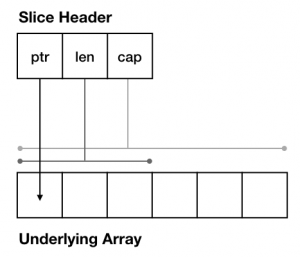
- Descriptor for an underlying array segment
- May grow and shrink
- Has length and capacity
- Assigning a slice copies the descriptor, not the underlying array
- Common slice operations:
- The slice operator
s[i:j], where 0 <= i <= j <= cap(s), creates a new slice that refers to elements i through j - 1 of the sequence s.
len(s)
s[i]
s[i:j]
append(s, x)  // append element x to slice s and return new slice
<Code Time.go>
- Arrays
<Code Time.go>
- Slices with
make - Print the address of the slice and of its first element, before and
after an
append
Result
s1: [10 20 30 0 0 0 0 0 0 0], len(s1): 10, cap(s1): 10
s1: [10 20 30 0 0 0 0 0 0 0 10], len(s1): 11, cap(s1): 20
s2: [10], len(s2): 1, cap(s2): 10

before appending a new variable into s
address of s is 0x76fb35a2a048
address of s[0] is 0x76fb35a280a0
after appending a new variable into s
address of s is 0x76fb35a2a048
address of s[0] is 0x76fb35a24140
- The append passed the capacity, so Go allocated a new array and copied: capacity went 10 → 20
- The slice header did not move, but
&s[0] changed: anything still pointing at the old array no longer sees the updates
<Code Time.go>
- Slice operations
Structures
package main

type Sample struct {
  S1      int
  S2      int
  S3      string
  private float64
}

func main() {
  var smp Sample
  smp.S1 = 10
  smp.S2 = 20
  smp.S3 = "Hello World"
}
- A struct is an aggregate data type that groups together zero or more named values of arbitrary types as a single entity
- Each value is called a field
- C Structures 🕺
- Data hiding:
- The name of a struct field is exported if it begins with a capital letter; this is Go's main access control mechanism.
S1,S2,S3are public and can be accessed from anywhere.privateis private and is only visible to code in the same package.
Methods
package main

import "fmt"

type Example struct {
  Val   string
  count int
}

// define a custom type based on go standard types
type integer int

func (i integer) log() {
  fmt.Printf("%d\n", i)
}

// pointer reciever which can change 'example' fields
func (e *Example) Log() {
  e.count++
  fmt.Printf("%d %s\n", e.count, e.Val)
}

func main() {
  var i integer
  exm := Example{
    Val:   "Example",
    count: 10}
  i.log()
  exm.Log()
}
<Code Time.go>
- Compare two structs with
==, then add a slice field and try again - Give the type a
String()method and print it withPrintln
Result
we can compare student structs
Name: Parham, Family: Alvani, age: 27
student, Parham Alvani
Hello Torvalds, I am Parham Alvani (27)
PrintlnfoundString()and used it, instead of printing the fields- Uncomment the slice field and the comparison stops compiling: a struct is comparable only when all of its fields are
Interfaces
package main

import "fmt"

type Printer interface {
  Print()
}

type Foo struct {
  X, Y int
}

type Bar struct {
  X, Y float64
}

func (f Foo) Print() {
  fmt.Printf("%d %d\n", f.X, f.Y)
}

func (b Bar) Print() {
  fmt.Printf("%g %g\n", b.X, b.Y)
}
<Code Time.go>
- Assign a
Studentto aPrinter, with no "implements" anywhere - Assert back to a concrete type, with and without the
, okform, then use a type switch
Result
Linus Torvalds
p is not a person
Hello
StudentsatisfiesPrinterjust by having the method: interfaces are satisfied implicitlyp.(Person)without, okwould panic; with it you getfalseinstead
Casting Types
- type conversion: A type conversion is similar to a cast in C. It reinterprets the value as a new type
package main

import "fmt"

func main() {
  one := 1

  var f float32 = float32(one)

  fmt.Println(f) // 1
}
Type Assertion
- type assertion: They do not convert between types; they simply state to the compiler that the underlying value has the specific type.
package main

import "fmt"

type example struct {
  A int
}

func main() {
  j := example{A: 10}

  var k any = j

  fmt.Println(k.(example).A) // 10

  // the comma-ok form does not panic when the type does not match
  if e, ok := k.(example); ok {
    fmt.Println(e.A) // 10
  }
}

Create Point Interface
type Point interface {
  Distance() float64
  ImageOnX() float64
  ImageOnY() float64
}
Create Cartesian Point Structure
type Cartesian struct {
  X float64
  Y float64
}

func (c *Cartesian) Distance() float64 {
  return math.Sqrt(c.X*c.X + c.Y*c.Y)
}

func (c *Cartesian) ImageOnX() float64 {
  return c.X
}

func (c *Cartesian) ImageOnY() float64 {
  return c.Y
}
Create Polar Point Structure
type Polar struct {
  R    float64
  Theta float64
}

func (p *Polar) Distance() float64 {
  return p.R
}

func (p *Polar) ImageOnX() float64 {
  return p.R * math.Cos(p.Theta)
}

func (p *Polar) ImageOnY() float64 {
  return p.R * math.Sin(p.Theta)
}
func main() {
  p := Polar{
    R:    1,
    Theta: math.Pi / 2,
  }

  c := Cartesian{
    X: 3,
    Y: 4,
  }

  fmt.Printf("%g %g\n", p.Distance(), c.Distance())
  fmt.Printf("%g %g\n", c.ImageOnX(), c.ImageOnY())
  fmt.Printf("%g %g\n", p.ImageOnX(), p.ImageOnY())
}
package main

import (
  "fmt"
  "math"
)

type Point interface {
  Distance() float64
  ImageOnX() float64
  ImageOnY() float64
}

type Cartesian struct {
  X float64
  Y float64
}

func (c *Cartesian) Distance() float64 {
  return math.Sqrt(c.X*c.X + c.Y*c.Y)
}

func (c *Cartesian) ImageOnX() float64 {
  return c.X
}

func (c *Cartesian) ImageOnY() float64 {
  return c.Y
}

type Polar struct {
  R    float64
  Theta float64
}

func (p *Polar) Distance() float64 {
  return p.R
}

func (p *Polar) ImageOnX() float64 {
  return p.R * math.Cos(p.Theta)
}

func (p *Polar) ImageOnY() float64 {
  return p.R * math.Sin(p.Theta)
}

func main() {
  p := Polar{
    R:    1,
    Theta: math.Pi / 2,
  }

  c := Cartesian{
    X: 3,
    Y: 4,
  }

  fmt.Printf("%g %g\n", p.Distance(), c.Distance())
  fmt.Printf("%g %g\n", c.ImageOnX(), c.ImageOnY())
  fmt.Printf("%g %g\n", p.ImageOnX(), p.ImageOnY())
}

Go Packages
- A package is made up of Go files that live in the same directory and have the same package statement at the beginning.
greet Package
└── gopherguides
    └── greet
        └── greet.go
package greet

import "fmt"

func Hello() {
    fmt.Println("Hello, World!")
}
main Package
└── gopherguides
    └── example
        └── main.go
package main

import "github.com/gopherguides/greet"

func main() {
    greet.Hello()
}
- Go does not have the concept of public, private, or protected modifiers like other languages do.
- External visibility is controlled by capitalization.
- Types, variables, functions, and so on, that start with a capital letter are available, publicly, outside the current package.
- A symbol that is visible outside its package is considered to be exported.
Go Modules
- A module is a collection of packages that are released, versioned, and distributed together. Modules may be downloaded directly from version control repositories or from module proxy servers.
- A module is identified by a module path, which
is declared in a
go.modfile, together with information about the module's dependencies. - the module
golang.org/x/netcontains a package in the directoryhtml. That package's path isgolang.org/x/net/html.
Module Path
- A module path should describe both what the module does and where to find it.
- The repository root path is the portion of the module path that corresponds to the root directory of the version control repository where the module is developed.
- Most modules are defined in their repository's root directory, so this is usually the entire path.
- For example, golang.org/x/net is the repository root path for the module of the same name.
- If the module is not defined in the repository's root directory, the module subdirectory is the part of the module path that names the directory, not including the major version suffix.
- If the module is released at major version 2 or higher, the module path must end with a major version suffix like /v2.
- This may or may not be part of the subdirectory name. For example, the module with path golang.org/x/repo/sub/v2 could be in the /sub or /sub/v2 subdirectory of the repository golang.org/x/repo.
HTTP Server
- We want to write our own HTTP server, and handle requests our way
net/httpis in the standard library, so there is nothing to install and nothing to keep up to date- Since Go 1.22 the built-in router understands methods and path parameters, which is what most people used to reach for a framework to get
Learn the standard library first. When you later pick a framework, you will know exactly what it is doing for you.
The Whole Server
package main

import (
  "fmt"
  "log"
  "net/http"
)

func main() {
  mux := http.NewServeMux()

  mux.HandleFunc("GET /hello", func(w http.ResponseWriter, r *http.Request) {
    fmt.Fprintln(w, "Hello World")
  })

  log.Fatal(http.ListenAndServe(":1373", mux))
}
- No dependencies, no
go get, one file
Handlers
- A handler is anything with this method:
type Handler interface {
  ServeHTTP(w http.ResponseWriter, r *http.Request)
}
w is where you
write the response,
r is the request you
readhttp.HandlerFunc adapts a plain function
to that interface, which is why HandleFunc accepts a
functionRouting Patterns
mux.HandleFunc("GET /hello", h.Get)
mux.HandleFunc("POST /hello", h.Post)
mux.HandleFunc("GET /hello/{username}", h.User)
- A leading method restricts the route; a
request with the wrong method gets
405 Method Not Allowedwithout you writing anything {username}is a wildcard, read back withr.PathValue("username"){path...}matches the rest of the path, and a trailing/matches a subtree- When two patterns match, the more specific one wins
Reading the Request
// path:  GET /hello/{username}
name := r.PathValue("username")

// query: GET /hello?hello=IE
value := r.FormValue("hello")

// body:  POST /hello  with application/json
var req request.Name
if err := json.NewDecoder(r.Body).Decode(&req); err != nil {
  http.Error(w, err.Error(), http.StatusBadRequest)
  return
}
- Check the
Content-Typebefore decoding, withmime.ParseMediaType, soapplication/json; charset=utf-8is still accepted
Writing the Response
enc, err := json.Marshal(fmt.Sprintf("Hello World from %s", h.From))
if err != nil {
  w.WriteHeader(http.StatusInternalServerError)
  return
}

w.Header().Set("Content-Type", "application/json")
w.WriteHeader(http.StatusOK)
_, _ = w.Write(enc)
- Order matters: headers, then status, then body
- Writing the body first sends an implicit
200, and yourWriteHeaderafterwards is ignored
Handlers That Need Something
- A handler usually needs a logger, a database, a config. Make it a method on a struct instead of reaching for a global
type Hello struct {
  From   string
  Logger *slog.Logger
}

func (h Hello) User(w http.ResponseWriter, r *http.Request) {
  h.Logger.Info("path parameter", "username", r.PathValue("username"))
  w.WriteHeader(http.StatusNoContent)
}

// wiring it up
h := handler.Hello{From: "Golang", Logger: logger}
mux.HandleFunc("GET /hello/{username}", h.User)
Middleware Is Just a Function
func logging(logger *slog.Logger, next http.Handler) http.Handler {
  return http.HandlerFunc(func(w http.ResponseWriter, r *http.Request) {
    start := time.Now()

    next.ServeHTTP(w, r)

    logger.Info("request",
      "method", r.Method,
      "path", r.URL.Path,
      "took", time.Since(start),
    )
  })
}

srv.Handler = logging(logger, mux)
- Takes a handler, returns a handler. Auth, CORS, and recovery are all this same shape, and they compose by nesting
Do Not Use ListenAndServe in Production
- The package-level helper has no timeouts, so one slow client can hold a connection open forever
srv := &http.Server{
  Addr:              "0.0.0.0:1373",
  Handler:           mux,
  ReadHeaderTimeout: 5 * time.Second,
  ReadTimeout:       15 * time.Second,
  WriteTimeout:      15 * time.Second,
  IdleTimeout:       60 * time.Second,
}
Graceful Shutdown
ctx, stop := signal.NotifyContext(context.Background(),
  os.Interrupt, syscall.SIGTERM)
defer stop()

go func() {
  if err := srv.ListenAndServe(); err != nil &&
    !errors.Is(err, http.ErrServerClosed) {
    logger.Error("http server failed", "error", err.Error())
  }
}()

<-ctx.Done()

shutdownCtx, cancel := context.WithTimeout(context.Background(), 10*time.Second)
defer cancel()

_ = srv.Shutdown(shutdownCtx)
Shutdownstops accepting new connections and lets in-flight requests finish- A clean stop returns
http.ErrServerClosed, so that one is not an error
<Code Time.go>
- Run the server, then talk to it with
curl - Watch the structured log on the server side while you do
go run ./httpserver
Result
$ curl -i localhost:1373/hello
HTTP/1.1 200 OK
Content-Type: application/json
Content-Length: 25

"Hello World from Golang"

$ curl -i -X POST -H 'Content-Type: application/json' \
    -d '{"name":"Parham","count":3}' localhost:1373/hello
HTTP/1.1 200 OK
Content-Type: application/json

"Hello to Parham from Golang"

$ curl -o /dev/null -w '%{http_code}\n' -X DELETE localhost:1373/hello
405
- Nobody wrote that 405. There is a
GET /hellopattern and noDELETEone, so theServeMuxanswered for us
Server Side
level=INFO msg="http server listening" addr=0.0.0.0:1373
level=INFO msg="read hello from query parameter" handler=hello hello=IE
level=INFO msg="read username from path parameter" handler=hello username=parham
level=INFO msg="There is a count" handler=hello count=3
log/slogwrites key-value pairs, so the logs are greppable and machine readable without a libraryhandler=hellocomes fromlogger.With("handler", "hello")— set once at wiring time, attached to every line
Goroutines
- The
gostatement launches a function call as a goroutine
go f()
go f(x, y, ...)
A Simple Example
Function f is launched as 3 different goroutines, all running concurrently:
package main

import (
  "fmt"
  "time"
)

func f(msg string, delay time.Duration) {
  for {
    fmt.Println(msg)
    time.Sleep(delay)
  }
}

func main() {
  go f("A--", 300*time.Millisecond)
  go f("-B-", 500*time.Millisecond)
  go f("--C", 1100*time.Millisecond)
  time.Sleep(20 * time.Second)
}
Communication via channels
- A channel type specifies a channel value type (and possibly a communication direction):
chan int
chan<- string  // send-only channel
<-chan T       // receive-only channel
var ch chan int
ch := make(chan int)  // declare and initialize with newly made channel
ch <- 1   // send value 1 on channel ch
x = <-ch  // receive a value from channel ch (and assign to x)
Communicating goroutines
Each goroutine sends its results via channel ch:
func f(msg string, delay time.Duration, ch chan string) {
  for {
    ch <- msg
    time.Sleep(delay)
  }
}
The main goroutine receives (and prints) all results from the same channel:
func main() {
  ch := make(chan string)
  go f("A--", 300*time.Millisecond, ch)
  go f("-B-", 500*time.Millisecond, ch)
  go f("--C", 1100*time.Millisecond, ch)

  for i := 0; i < 100; i++ {
    fmt.Println(i, <-ch)
  }
}